
LinkedIn Marketing
The LinkedIn Profile Makeover for Business Owners
Your LinkedIn profile is often one of the first places people go when they hear your name. So when they land there, can they quickly work out what you do, who you help and how to take the next step? If not, it might be time for a little profile makeover. Whether you sell a service, a product or a bit of both, this guide will help you turn your LinkedIn profile into something that actually helps your business.
The short of it…
A useful LinkedIn profile should answer four simple questions without making people work for it:
- Who are you?
- Who do you help?
- What do you actually do or sell?
- What should someone do next?
You do not need more buzzwords. You need more clarity.
First Things First: Your LinkedIn Profile Is Not Just a Résumé
If you run a business, your LinkedIn profile has a bigger job than listing where you have worked.
It is often the place someone checks after meeting you, hearing your name in a conversation, seeing one of your posts or getting referred to you.
And in those first few seconds, they are usually trying to answer something very simple:
“Is this person relevant to me?”
Your profile should help them answer that quickly.
Think of it as a tiny website for the human behind the business. It does not need every detail. It just needs the right ones.
Top Banana Tip: Open your profile in a private browser window and look at it like a complete stranger. Can you work out what you do in ten seconds? If you need a committee meeting to decode it, simplify it.
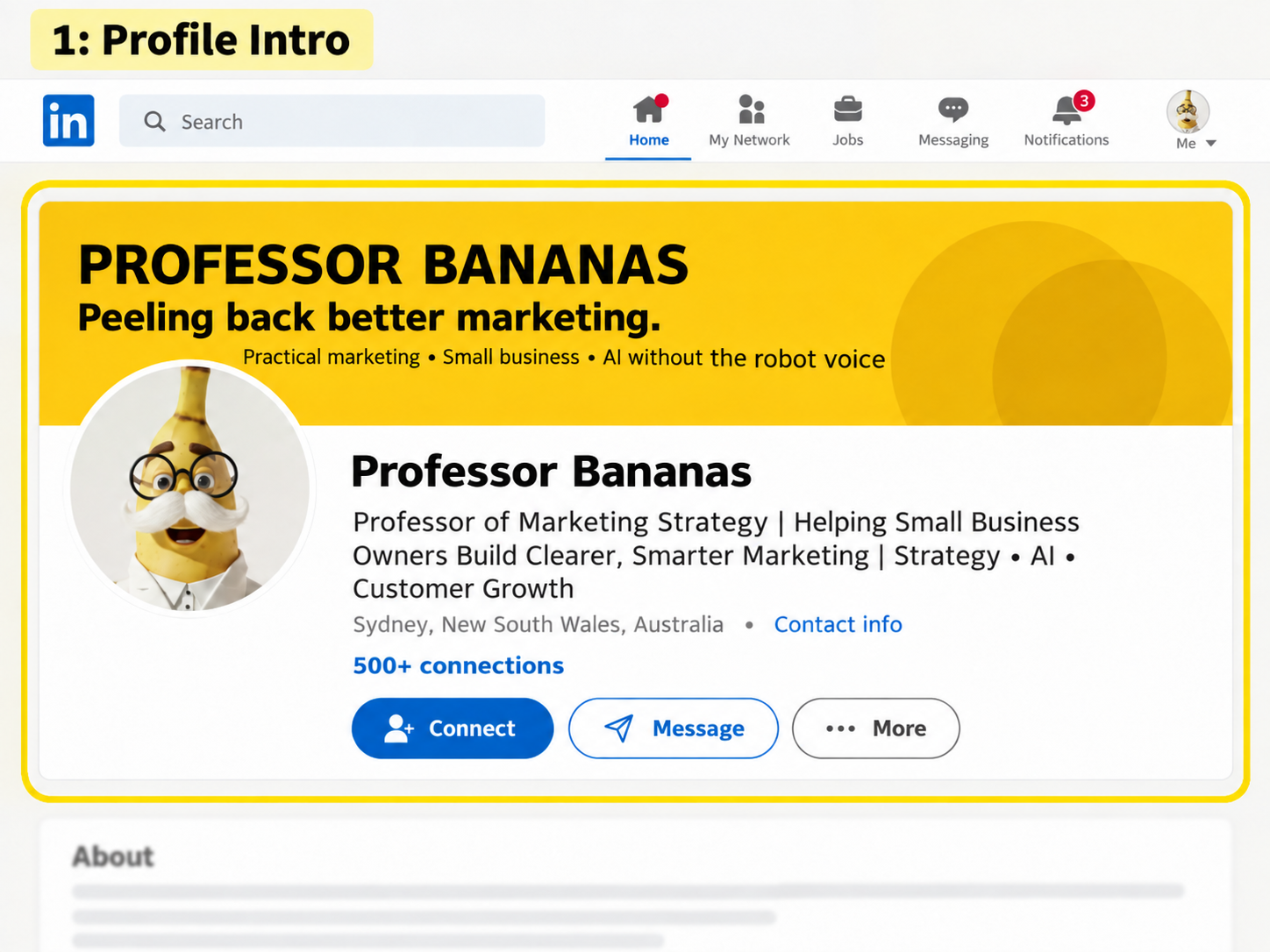
Meet Professor Bananas, our very real-looking but entirely fictitious LinkedIn guinea pig. We will use his profile throughout this guide to show you what each section can do.
1. Give Your Profile One Clear Job
Before you change the words, decide what you want people to do.
A profile with no clear next step tends to become a collection of nice-sounding information.
So start here:
After someone visits my LinkedIn profile, what would I ideally like them to do next?
For example:
- If you sell a service: send you a message, book a call, request a quote or look at your services.
- If you sell products: visit your shop, view a range, find a stockist or enquire about wholesale.
- If you are a consultant or expert: ask about a project, workshop, partnership or speaking opportunity.
- If you run a local business: visit your website, book, call or find you.
You can have more than one way to contact you, of course. But choose one main next step and let the rest of your profile support it.
2. Use a Photo People Can Actually Recognise
Professional does not have to mean painfully corporate.
Your profile photo has one simple job: help people recognise the human behind the business.
A good photo is usually:
- Recent
- Clear and well lit
- Mostly your face and shoulders
- Easy to recognise when it appears as a tiny circle
- Appropriate for the people you want to work with
You do not need a studio, three lights and a wind machine.
You probably do want to avoid the blurry crop from a wedding, the sunglasses-at-the-beach shot and the photo from 2009 that only your family still believes looks exactly like you.
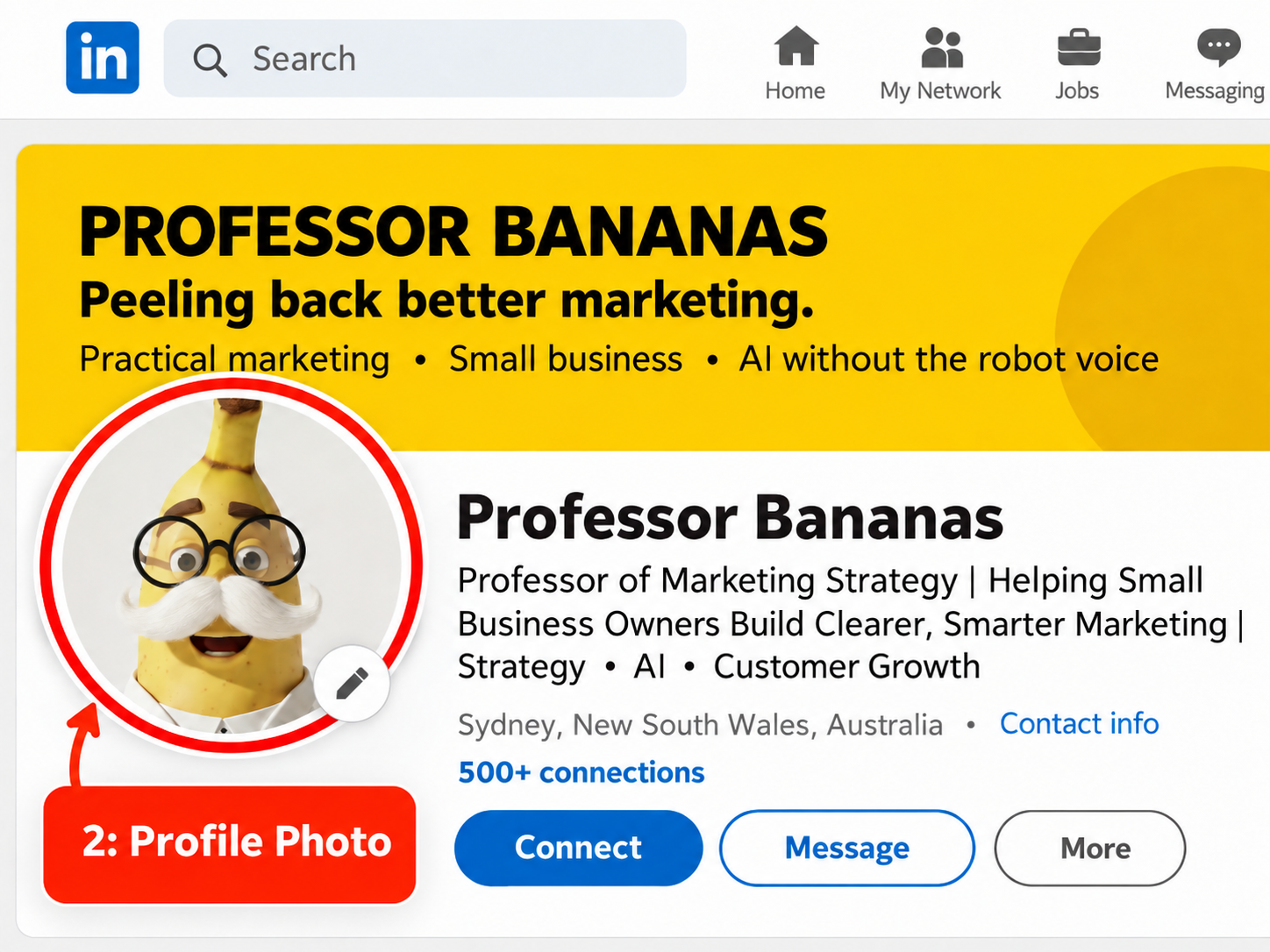
Top Banana Tip: If you meet customers in person, use a photo that means they will actually recognise you when you walk through the door.
3. Put Your Banner to Work
It is a very large piece of space. Make it useful.
Your banner is one of the first things people see, yet plenty of business owners leave it blank or use a picture that says absolutely nothing about the business.
LinkedIn recommends a background image size of 1584 × 396 pixels.
You do not need to turn it into a brochure. Keep it simple.
A useful banner might include:
- Who you help
- The result or experience you help create
- Your product or service category
- Your website
- A strong image of the product, team or work in action
Service business example:
Marketing mentoring for small business owners
Practical strategies you can actually put into action
yourwebsite.com
Product business example:
Thoughtfully designed storage for busy family homes
Made to make everyday life a little easier
Shop the range at yourwebsite.com
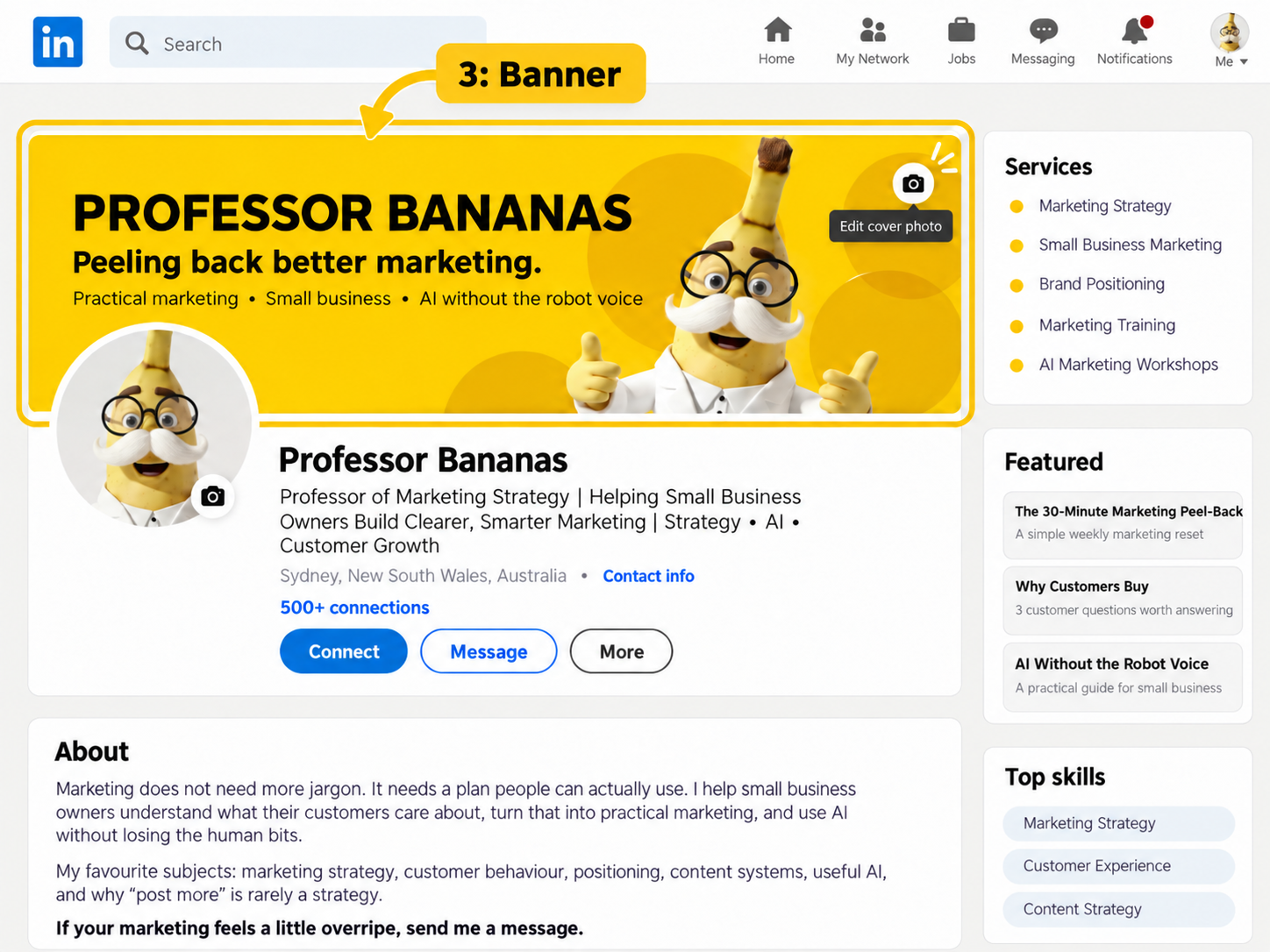
Top Banana Tip: Check your banner on desktop and mobile before declaring victory. Your profile photo can cover part of the artwork, so keep the important bits away from the lower-left corner.
4. Make Your Headline Useful
Your job title is not the whole story.
If your headline says:
Founder at Smith & Co
people now know you founded Smith & Co.
Excellent.
They still have no idea what Smith & Co does.
A more useful headline gives people a little more context. Try this formula:
Who you help + what you help them do + what you do
Service business examples:
- Helping growing businesses turn confusing numbers into clearer financial decisions | Accountant & Business Adviser
- Helping homeowners create calmer, more functional spaces | Interior Designer
- Practical marketing mentoring for small business owners | Strategy, content & customer growth
Product business examples:
- Thoughtfully designed storage for busy family homes | Founder at [Brand]
- Australian-made skincare for sensitive skin | Founder at [Brand]
- Helping independent retailers find gifts their customers actually want to buy | [Wholesale Brand]
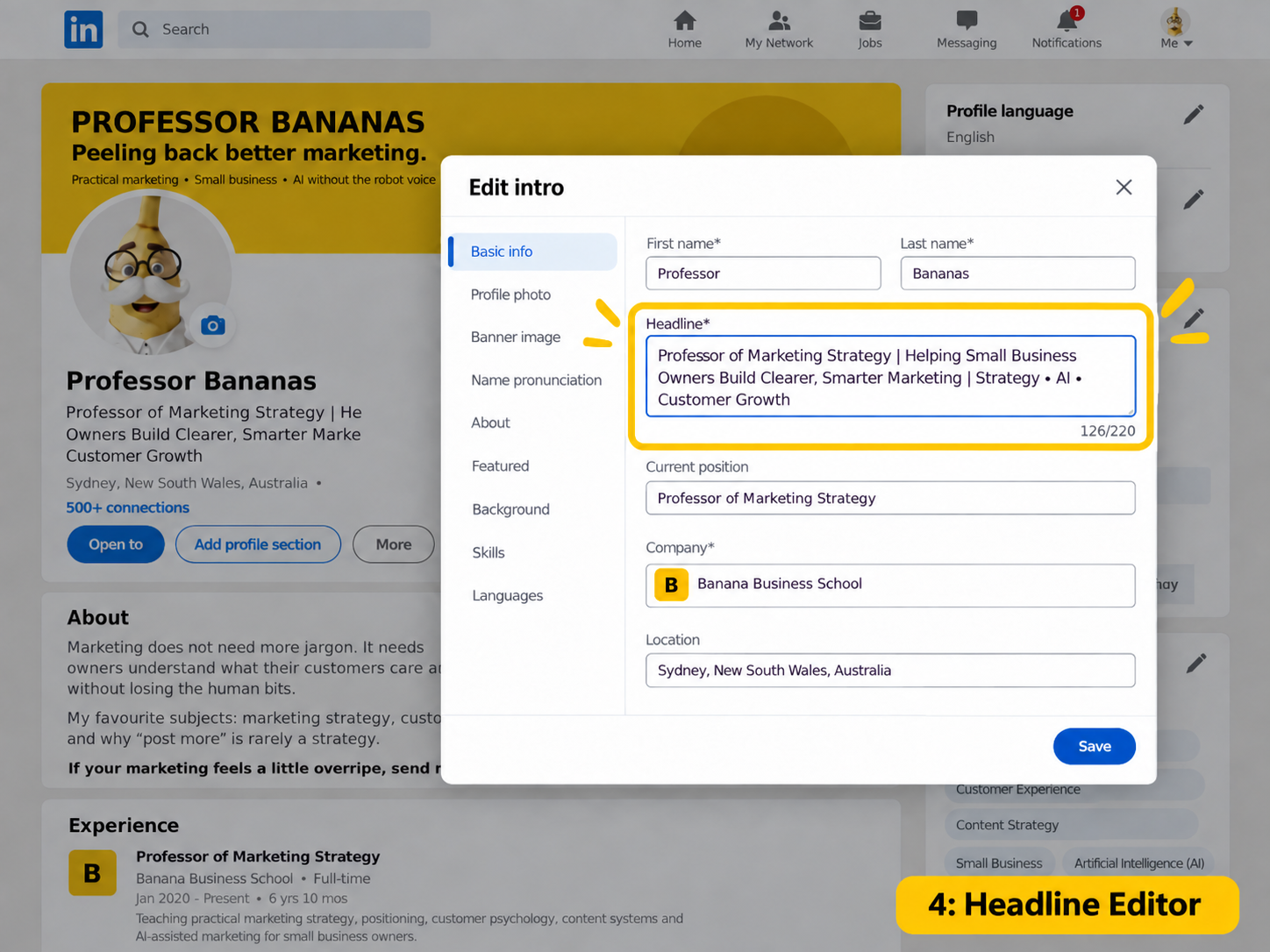
Top Banana Tip: Use words your customers would understand. If your headline sounds like it belongs on a lanyard at a corporate conference, give it another go.
5. Make the Next Step Obvious
Interested people should not need detective skills.
Someone has found you. They like what they see. Brilliant.
Now make sure they can actually work out how to contact you.
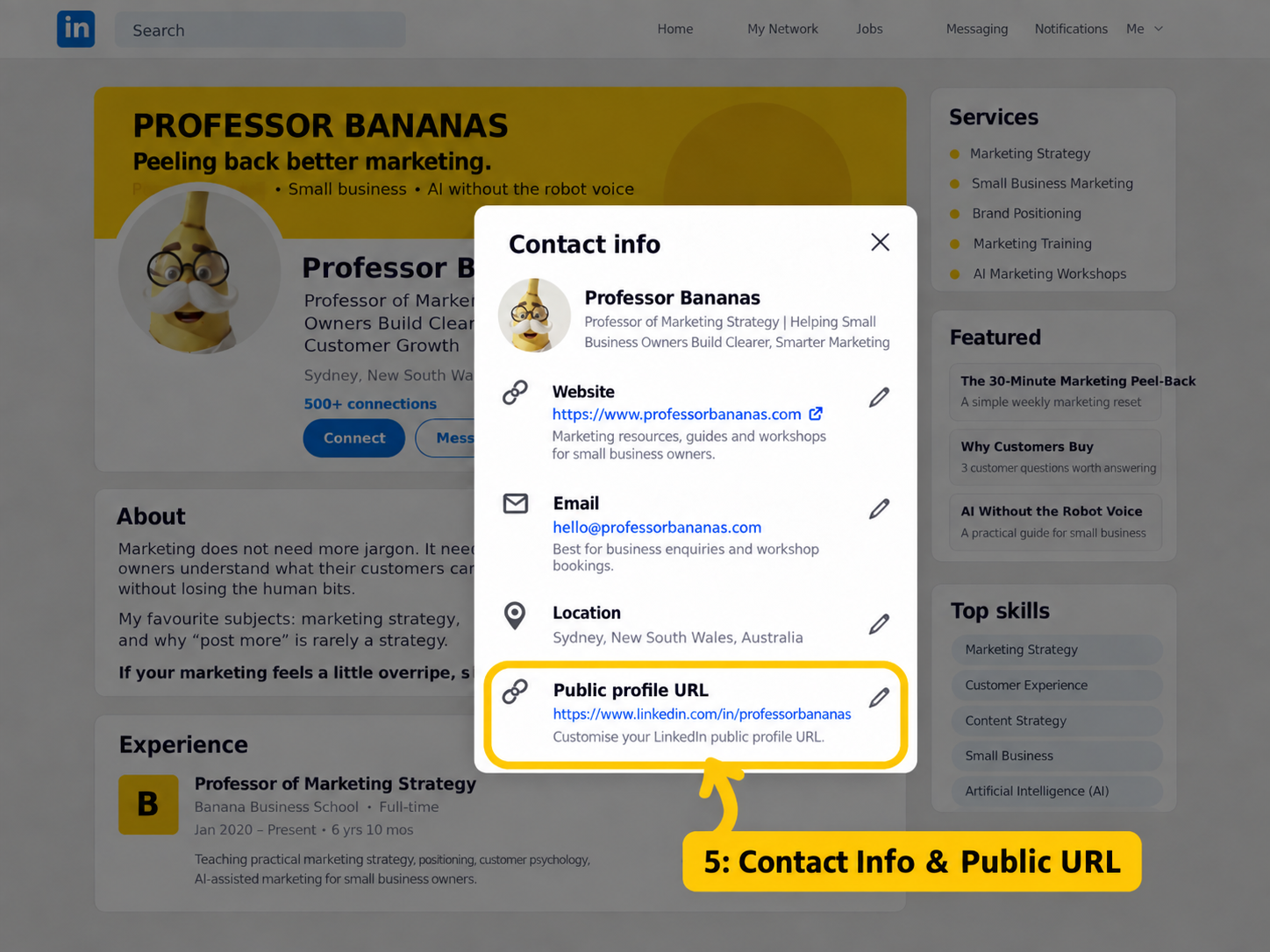
Check your Contact info and make sure the useful details are current. Depending on your business, that could include:
- Your website
- Your business email
- Your phone number
- Your location
- Your booking or enquiry destination
It is also worth tidying your public LinkedIn URL so it is easier to share.
linkedin.com/in/janetsmith is much nicer on an email signature or business card than a heroic string of random numbers.
If your account gives you the option to add a custom profile button, point it somewhere useful, such as your website, booking page or online shop. Treat it as a bonus, not the foundation of the profile.
6. Write an About Section Like a Human
Start with something your customer might actually care about.
Please do not feel obliged to begin with:
“I am a highly motivated, results-driven professional with more than 20 years of experience…”
LinkedIn has enough of those already.
Your About section is a chance to make the business easy to understand and give people a feel for how you think.
Use this simple structure:
- Who do you help?
- What problem do you solve or what do you sell?
- What makes your approach or product useful?
- What proof or experience can you point to?
- What should someone do next?
Service business example:
Running a small business is already a full-time job. Marketing should not feel like another one.
We help small business owners build practical marketing that attracts the right customers without chasing every shiny new tactic.
Our approach is hands-on, human and built for the real world.
Want to talk through your marketing? Send me a message or visit [website].
Product business example:
We created [Brand] because finding [type of product] that was both [benefit] and [benefit] should not be this hard.
Today we make [products] for [type of customer], with a focus on [important point of difference].
We sell directly to customers and work with selected retailers across [market/location].
Browse the range at [website] or message me about wholesale.
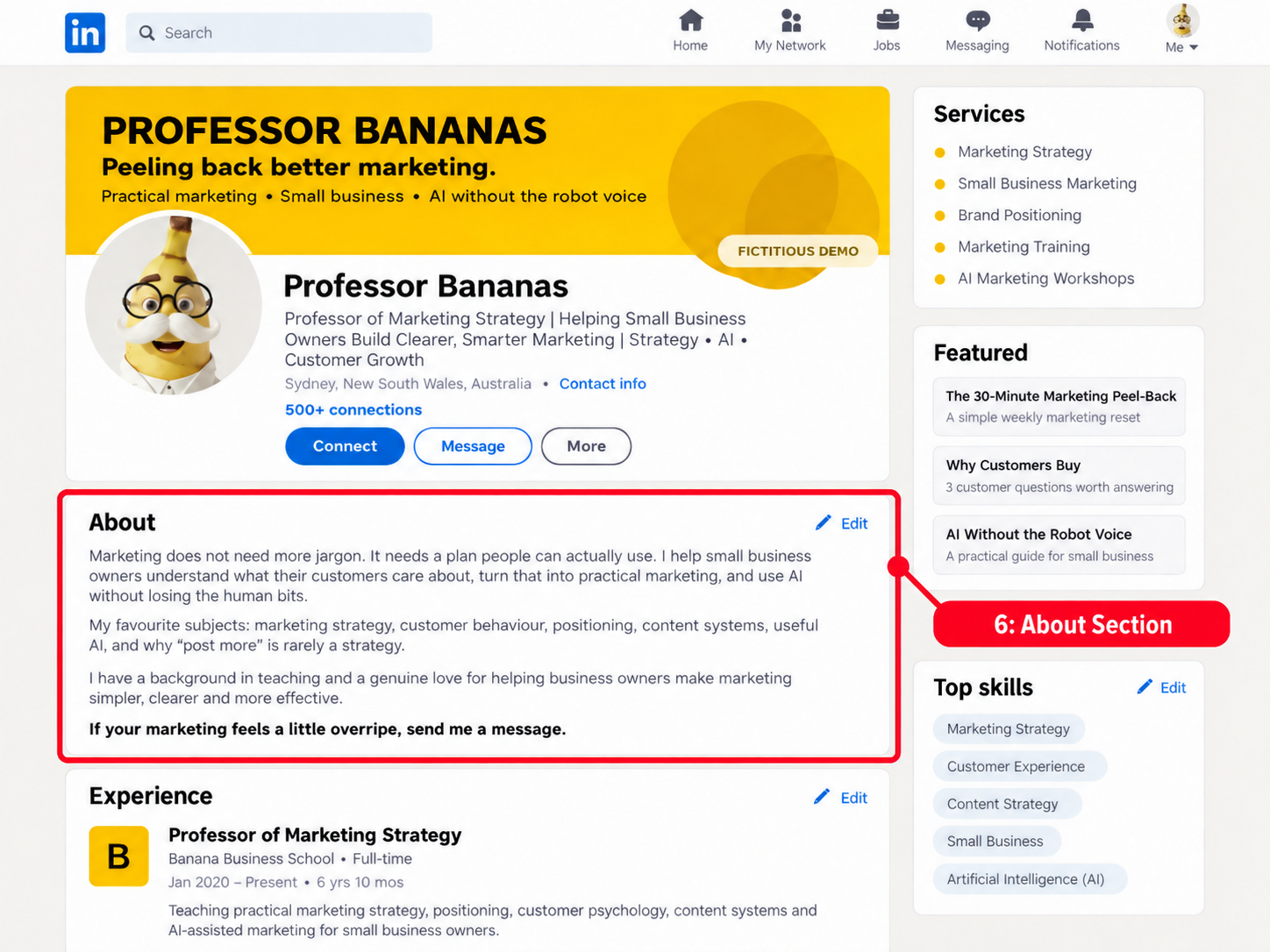
Top Banana Tip: Read your About section out loud. If you would never say it to a customer, rewrite it until it sounds more like you.
7. Make Your Experience Section Earn Its Keep
“Founder, 2021 to Present” is technically correct. It is also not terribly helpful.
Your current Experience entry is a handy place to explain the business in a little more detail.
Give people a quick snapshot of:
- Who you work with
- What you sell
- The problems you help solve
- What makes the business different
- Relevant results, milestones or proof
- How somebody can take the next step
Short paragraphs and a few useful bullets are plenty. You are helping somebody understand the business, not submitting evidence to a royal commission.
Top Banana Tip: Pretend the reader has never heard of your business. Would this section still make sense?
8. Use Featured as Your Shop Window
Do not feature something just because it got a lot of likes.
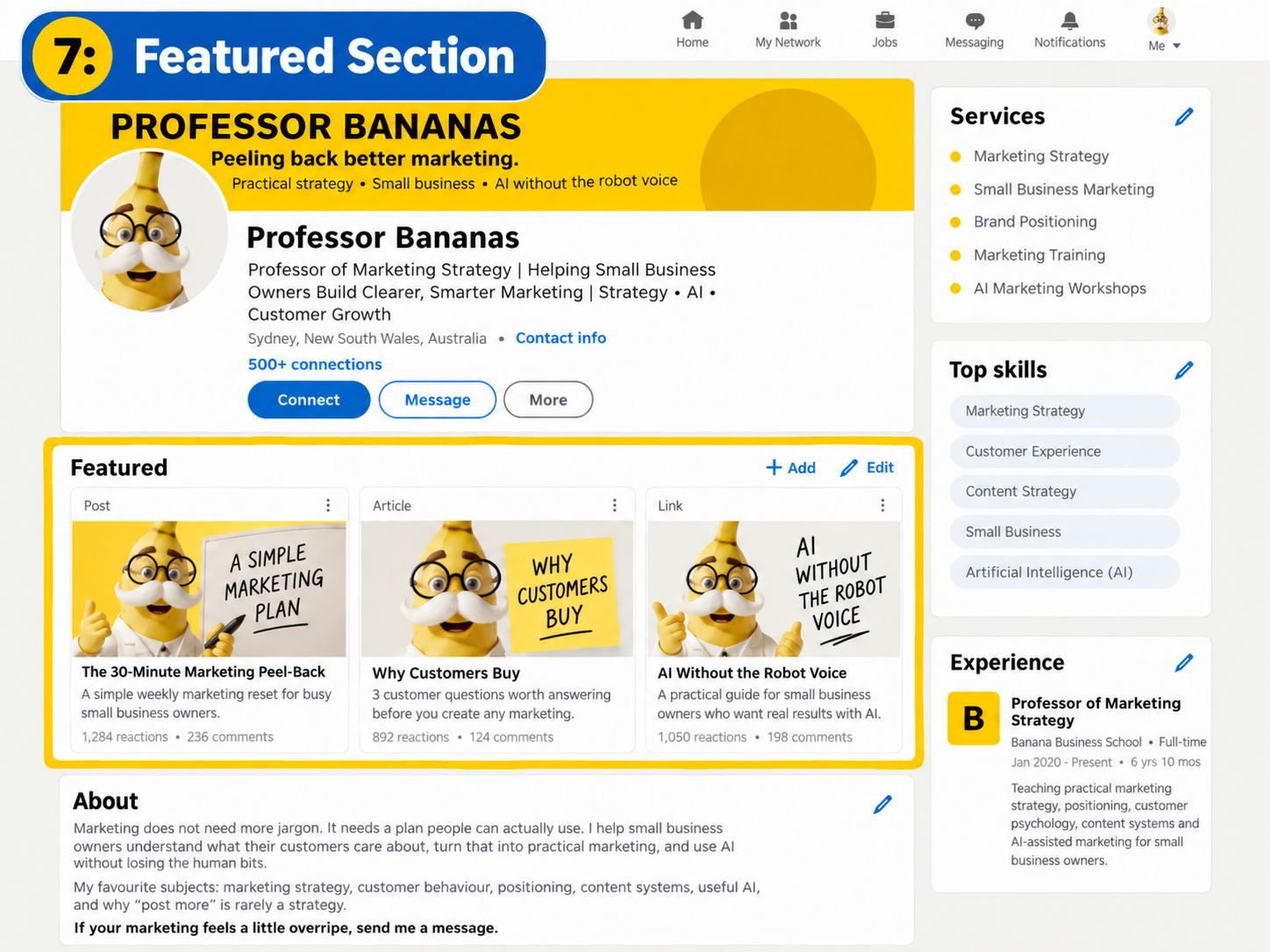
Your Featured section is valuable space. Use it to show people something that helps them understand, trust or buy from you.
If you sell a service, feature things like:
- A useful case study
- Your main service page
- A strong customer story
- A booking or enquiry page
- A practical guide or resource
If you sell products, feature things like:
- Your online shop
- A bestseller or collection
- A product demonstration
- Your stockist or wholesale page
- A customer story showing the product in real life
One very useful question:
If somebody only clicked one thing on my profile, what would I most want them to see?
Start there.
9. Tweak It for Products or Services
The principles stay the same. The path to buying changes.
If You Sell a Service
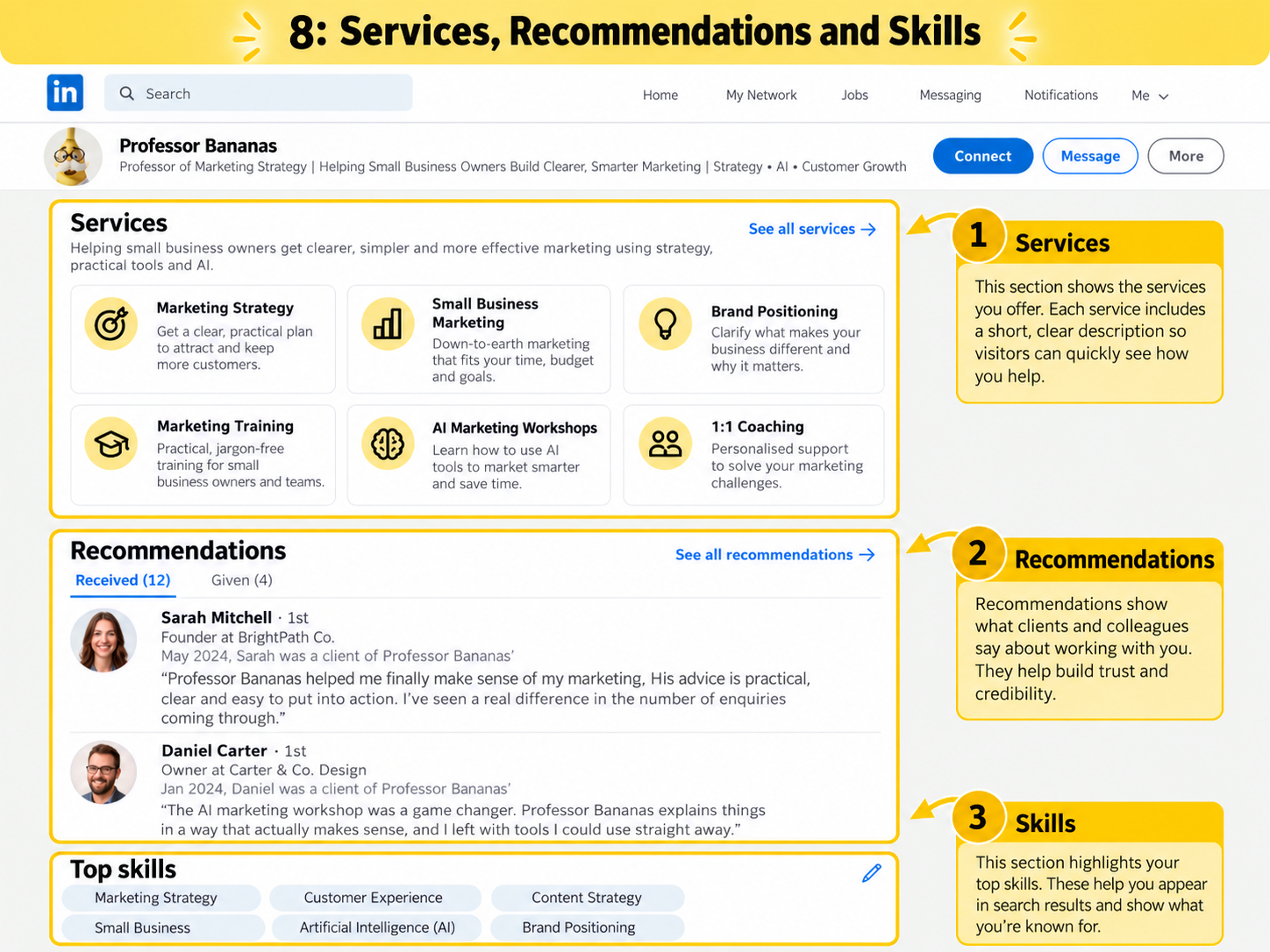
If service enquiries are important to your business, LinkedIn’s service options can give people another way to understand what you offer.
The important bit is not simply listing a category. Make the surrounding description useful.
Instead of stopping at:
Strategic Consulting
say what that actually means to the customer:
Helping growing businesses turn scattered marketing into a clear, practical marketing system.
If You Sell Products
Your personal profile does not need to become a catalogue.
Use it to build trust in the person and story behind the brand, then make the buying path easy to find.
That might be:
- Shop online
- View the collection
- Find a stockist
- Enquire about wholesale
- Talk to us about corporate or bulk orders
If your business has a LinkedIn Company Page, connect your current Experience entry to the correct Page so the business identity is easy to recognise.
Top Banana Tip: People buy products, but they also buy stories, trust and confidence. Your personal profile can help with all three without turning into a 24-hour ad.
10. Add Proof People Can Trust
You saying you are brilliant is marketing. Other people saying it is proof.
Recommendations are useful because they add a voice that is not yours.
Ask customers, collaborators or partners who genuinely know your work.
And make it easy for them.
Instead of:
“Can you write me a LinkedIn recommendation?”
try:
“Would you be happy to write a short LinkedIn recommendation about what we worked on, what the experience was like and what changed as a result? No need to make it fancy. A few genuine sentences would be brilliant.”
Then give your Skills section a tidy-up.
You do not need to preserve every skill you have collected since your first job.
Prioritise the things you actually want to be known for now.
11. Back It Up With Useful Activity
Your profile tells people what you do. Your activity gives them a taste of what you know.
You do not need to post every day.
You definitely do not need to announce that you are “thrilled to share” something three times a week.
A simple rhythm is enough:
- One useful post: answer a question customers ask all the time.
- One proof post: share a result, lesson, project or product story.
- One human post: show something real from behind the scenes.
Then spend a little time having actual conversations in the comments and messages.
That is usually far more useful than treating LinkedIn like a content treadmill.
Your 30-Minute LinkedIn Profile Makeover
No need to spend your entire afternoon on this. Set a timer and work through the bits that matter most:
- ✓ 3 mins: Decide the main action you want visitors to take.
- ✓ 3 mins: Check your profile photo.
- ✓ 4 mins: Put your banner to work.
- ✓ 4 mins: Rewrite your headline.
- ✓ 5 mins: Improve the first half of your About section.
- ✓ 3 mins: Check your website, contact details and public URL.
- ✓ 3 mins: Choose what belongs in Featured.
- ✓ 3 mins: Improve your current Experience entry.
- ✓ 2 mins: Ask one happy customer for a recommendation.
Total: 30 minutes.
Clearer profile. Better first impression. Easier next step. Done.
Give It the Five-Second Test
When you are finished, show the top of your LinkedIn profile to somebody who does not work in your business.
Give them five seconds, then ask:
- What do you think I do?
- Who do you think I help?
- What would you do next if you wanted to work with me or buy from me?
If the answers are fuzzy, resist the urge to add another paragraph.
Make what is already there clearer.
Frequently Asked Questions
Do I need a personal LinkedIn profile if my business already has a Company Page?
For many small business owners, yes. People often want to understand the human behind the business. Your personal profile and Company Page can support each other, but they do not have to do exactly the same job.
Should I write my profile in first person or third person?
First person is usually the more natural option. “I help…” sounds like you are talking to someone. Writing “Denise is a highly experienced…” can feel a little like you hired a narrator.
Should I put prices on LinkedIn?
If public pricing helps customers make a decision, go for it. If your pricing depends on the project, product or customer, simply make the next step clear instead.
Do I need LinkedIn Premium?
No. A clear, useful profile does not depend on Premium. Paid features can add options, but they cannot rescue confusing positioning.
How often should I update my profile?
Give it a quick review every few months and whenever your offer, audience, website, positioning or main call to action changes.
Final Thoughts
Your LinkedIn profile does not need to be impressive.
It needs to be clear.
Help people quickly understand what you do.
Show them enough to trust you.
Give them an obvious next step.
Then get back to running the business.
The goal is not to win LinkedIn.
The goal is for the right person to land on your profile and think:
“Yep. This looks like the person I should talk to.”